
Set Up Claude Code for OpenClaw
Connect your Claude Pro subscription to OpenClaw using Claude Code. Step-by-step for Mac and Windows.
OpenClaw uses Claude as its AI engine. To make your assistant work, you need to connect your Claude Pro subscription using Claude Code.
Do NOT use the Anthropic API
OpenClaw does not use the classic Anthropic API from platform.claude.com. That's pay-per-token and costs a lot more than a Claude subscription.
Step 1 — Subscribe to Claude Pro
Go to claude.ai/pricing and subscribe to Claude Pro ($20/month) or Claude Max ($100-200/month).
Once your subscription is active, you can install Claude Code to get your API key.
Step 2 — Install Claude Code
Claude Code is the official tool that lets OpenClaw use your Claude subscription.
On Mac — open a terminal and run:
curl -fsSL https://claude.ai/install.sh | bashDon't know how to open a terminal?
Open Spotlight (Cmd+Space), type "Terminal", and press Enter.
On Windows — first install Git if you don't have it:
winget install --id Git.Git -e --source wingetThen install Claude Code:
irm https://claude.ai/install.ps1 | iexStep 3 — Generate your token
In your terminal, run:
claude setup-tokenClaude will open a login page in your browser.
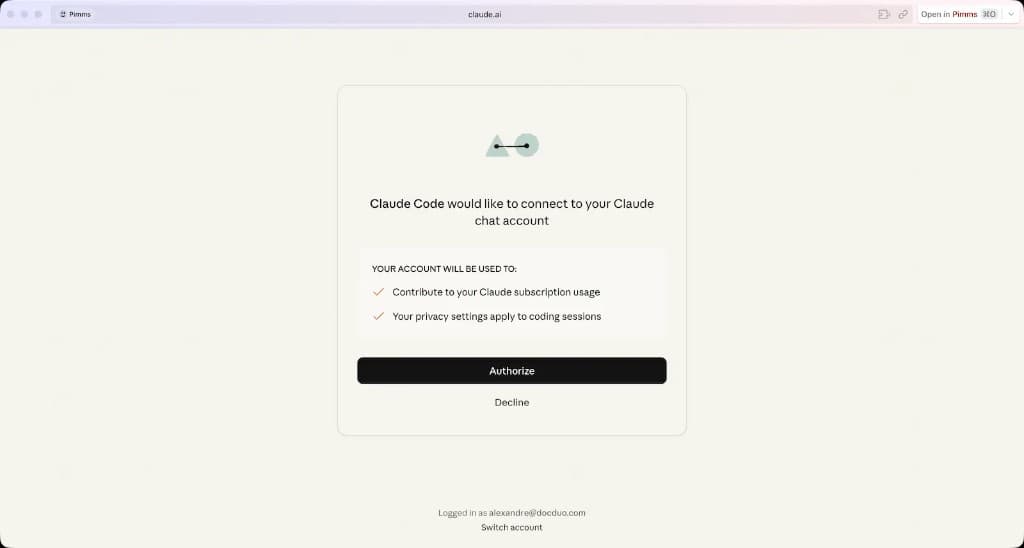
Log in with your Claude account and accept. Claude Code will generate an access token linked to your subscription. It looks like this:
sk-ant-xxxxxxxxxxxxxxxx
Copy this token — you'll paste it into your OpenClaw configuration as ANTHROPIC_API_KEY.
One line, no extra spaces
Selection in the terminal often includes a trailing newline or a stray space. Those characters count as part of the key, so auth fails even though the token looks correct.
After pasting, check that the value is exactly one line: nothing before sk-ant-, nothing after the last character, and no blank line under it in .env or your OpenClaw config.
Sanitize the clipboard (run this after you have copied the token from the terminal, then paste again from the clipboard):
# macOS
pbpaste | tr -d '\n\r' | pbcopy# Windows (PowerShell)
Set-Clipboard -Value ((Get-Clipboard).Trim())# Linux (X11, if xclip is installed)
xclip -selection clipboard -o | tr -d '\n\r' | xclip -selection clipboardCapture the token from the command output (no manual selection) — claude setup-token only supports --help; there is no --output or “copy to clipboard” flag. When setup finishes, Claude Code prints the token — often split across two lines (terminal width). A plain grep on each line only sees the first chunk, so you get nothing useful or a truncated key.
Log output first, complete the browser flow, then extract the full token (joins wrapped lines; stops at the blank line before Store this token):
claude setup-token 2>&1 | tee /tmp/claude-setup-token.log
# after the command exits:
perl -0777 -ne '
  if (/(sk-ant-oat01-[\s\S]*?)(?=\n\n|\z)/) {
    ($t = $1) =~ s/\n//g;
    $t =~ s/^\s+|\s+$//g;
    print "$t\n";
  }
' /tmp/claude-setup-token.log
rm /tmp/claude-setup-token.log   # contains a secret — delete it after copying
If the prefix ever changes from sk-ant-oat01-, adjust the Perl regex to match your log (or copy the two lines manually and delete the line break between them).
On Windows, use Git Bash, WSL, or Perl with the same one-liner; otherwise use manual copy + Set-Clipboard trim.
Common mistakes
Never create an API key on platform.claude.com
The Anthropic developer console (platform.claude.com) is for developers building apps with the API. It charges per token and is much more expensive than using your Claude Pro subscription through Claude Code.
Disable Extra Usage immediately
In your Claude account settings, find the option "Turn on extra usage to keep using Claude if you hit a limit" and make sure it is unchecked. If you leave it on, you may get surprise charges when you exceed your plan limits.
If you need more capacity, upgrade to Claude Max instead.
Need more capacity?
If you're hitting credit limits regularly, check our guide on optimizing your Claude Pro subscription to learn how to use Sonnet and Haiku strategically.